09.06.2026
GL Matrix & Cost Allocations
How Cost Allocations work
Default Cost Allocation Method at system level:
The system determines where to cost an employee's pay costs to in the following way:
- It uses their job title to determine which expense code to allocate costs to as per the mapping on GL matrix
- It uses the employee’s contract to determine which cost centre to allocate the EE's costs to
- It uses the employee’s contract to determine which project code to allocate the EE's costs to
Cost Allocation at individual Employee Level:
An ETB HR user would only set up a cost allocation for an individual employee if they wanted to split their pay costs across multiple cost centres/project codes/expense codes or if they wanted to allocate them to something other than the Default setting outlined above.
A cost allocation set at employee level supersedes what is mapped on the GL matrix.
Cost Allocations contained on an ETTO:
Any cost allocations included on an ETTO would also supersede the default cost allocation.
Profit & Loss GL Matrix
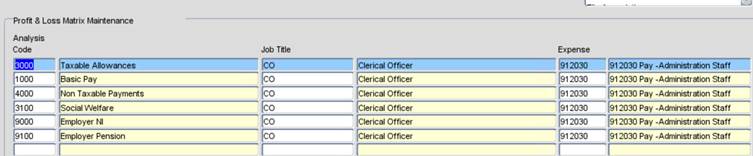
Job Titles are mapped to GL Expense codes for each ETB.
An ETB might get a GL error if a job title they have recently assigned to an employee is not mapped on their GL matrix. Or there might just be one line of mapping missing.
See sample of one job title mapping below: